Speed Game · How to host and play
Speed Game host guide: prepare and manage buzzer rounds
Explain the sequence before starting: press the buzzer, wait for the answering-turn confirmation, then answer. Players should watch both connection status and remaining time.
See the game screens
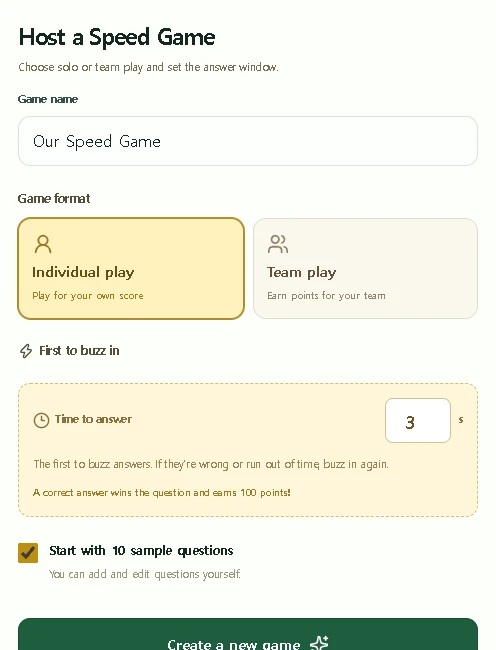
Room setupView full-size screenshot
- Set how long the player has to answer after winning the buzzer.
- Choose solo or team play, then create the room and share its code.
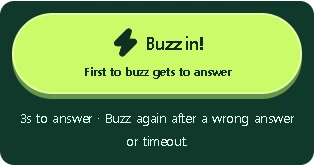
Practice screenView full-size screenshot
- Press the buzzer when it opens to request the turn.
- The answer window defaults to three seconds. Wait for it to reopen before buzzing again.
1. Set questions and the answer window
Choose questions that can be understood and answered clearly.
- Review each answer and its wording or options.
- The default buzzer answer window is 3 seconds; settings allow 1–30 seconds.
- Choose individual or team play and explain any rule changes.
2. Invite players and practise the controls
Check a real player screen before the match.
- Join through the invitation link or QR code and enter a name.
- Check team choices and the roster when using teams.
- Show players where the buzzer and answer controls appear.
3. Answer after receiving the turn
Press the buzzer once the question opens. If the screen confirms that the turn is yours, submit within the remaining time. Other players follow the waiting or unsuccessful-claim message until another opportunity opens.
4. Follow the next available state
After a wrong answer or an expired turn, wait for the next reception state on screen. Pressing a button alone does not establish ownership of the turn. Hosts should distinguish revealing an answer from moving to the next question.
5. Resolve mistakes and check the saved result
Hosts can preview a correction, bonus or penalty, choose its target and record a reason. After finishing, review the final ranking and save status, and keep the information needed to manage the room.
A script for the first buzzer round
Ask: What is the total length of a triangle’s three sides called? Offer perimeter, area and height. Set perimeter as the answer.
- Before opening the question, say: Buzz once when you know. Answer only when your name appears. In a spoken round, let everyone hear the question.
- Check that the winning player sees the right to answer. The other player reads the outcome and waits for the next available turn.
- After the answer, explain that sides of 2, 3 and 4 give a perimeter of 9. For longer entries, allow a longer answering window when preparing the next round.
Worked example: correcting an announced answer
Blue starts on 200 and Red on 100. A question asks for perimeter, but the key says “area”. Red answers “area” and receives 100 points. The scoreboard now shows 200–200.
- Close submissions and open score management in the rankings tab. Select the question, accept “perimeter” and set correct answers to 100, incorrect and missing answers to 0. Enter the reason, preview the affected players and apply.
- Red’s recorded answer loses its 100 points. Blue has 200 and Red has 100. Deducting another 100 from the team would count the correction twice. Tell the room the correct answer and revised scores.
Read next
Ready to play together?
Hosts can create a game. Invited players can enter their code on the game home page.
Go to game home