Why did pressing the buzzer not open an answer field?
Another player may have won the turn, or the game may not currently accept claims. Follow the winner, unsuccessful-claim or waiting message shown on screen.
Speed Game · Common questions
A buzzer result and an answer-submission result are different. First check whether you currently hold the answering turn.
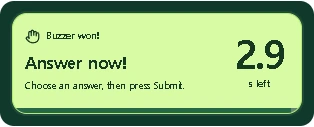
If the connection drops or an outcome is unclear, check connection status and wait for a confirmed result instead of repeatedly pressing controls.
Comparing the clocks on two phones can contradict the accepted turn and the score. Check the recorded holder for that question and the submitted answer together. Explain any adjustment for a host error before opening the next question.
Another player may have won the turn, or the game may not currently accept claims. Follow the winner, unsuccessful-claim or waiting message shown on screen.
Yes. The host can set the buzzer answer window from 1 to 30 seconds; the default is 3. Tell players which setting applies before the round.
No. The valid turn holder must submit the correct answer before the deadline to earn the default 100 points. Pressing the buzzer alone earns no points.
The turn belongs to the participant whose claim was accepted. Team play does not make the turn available on another teammate’s device. Earned points do contribute to the team total.
No. Reconnecting with valid saved access in the same browser does not restart the deadline. Clearing browser data or switching devices may also prevent returning automatically as the same player.
Yes. Score adjustments cover bonuses, penalties, totals and question grading or points. Check the target, reason and preview before applying, and explain the correction to the players.
The three-question demo is solo practice, not a real room record. For an actual match, check saving after the game ends. Pending, unknown or recovery states do not guarantee that every last action is preserved. Review any records you need before deleting a room; do not assume a deleted room can be restored.
The buzzer awards a turn. A player without a recorded answer has no answer to regrade. If revealing the wrong answer compromised the round, void the question and play a fresh one.
Hosts can create a game. Invited players can enter their code on the game home page.
Go to game homeYou can read this guide without a nickname or a room code. When you play, people in the same room may see your nickname and published results. Keep the host link private. See the information at the bottom of the game home for game record storage and deletion.